Automating daily SecOps metrics with Nanitor and Slack
Background
At Nanitor, where I serve as CTO and CISO, the operation is ISO 27001 certified, so the day-to-day is governed by a structured Information Security Management System (ISMS). This isn't just a certificate on the wall; it's a practical framework for managing risk. As part of our controls (e.g., A.5.7, A.8.7, A.8.8), we leverage our own Nanitor platform to support our threat intelligence and vulnerability management programs.
We apply a Continuous Threat Exposure Management (CTEM) methodology to continuously assess our entire technology estate. To make this data actionable, we track key ISMS metrics, including:
- Overall Health Score: A risk-prioritized score that gives us a high-level view of our security posture.
- Number of P0 Issues: A raw count of critical vulnerabilities and misconfigurations that require immediate attention.
A common question is why we chose to build a custom script instead of using Nanitor's native Slack integration. While the built-in integration is excellent for real-time alerting, notifying a channel the moment a new issue appears, it did not suit this particular use case. Our goal was to create a custom, daily summary dashboard for the team. For that, the Nanitor Public API provides the perfect flexibility to pull the exact metrics we need and format them into a concise daily report, as shown below.
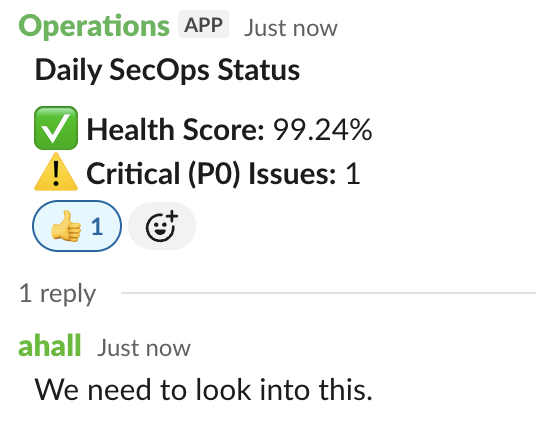
This automated post to our internal Slack channel is the reactive part of our SecOps. It provides the whole team with daily visibility, fosters discussion, and ensures our response processes are clear and effective. This post shares the simple script we use to achieve this.
Daily metrics only matter if they create action.
The Process Flow
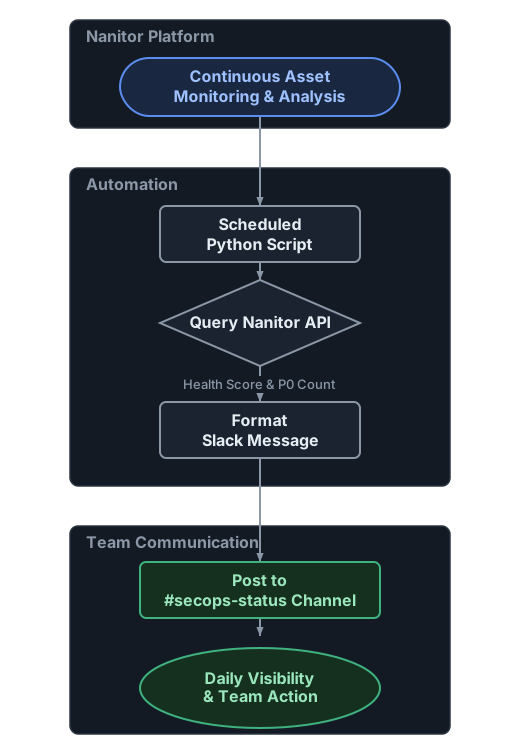
Before diving into the code, here is a high-level overview of the automated workflow:
The Automation Script
The script is a straightforward Python file that uses the requests library to talk to the Nanitor API and slack_sdk to post a message.
Prerequisites
- A running Nanitor instance.
- A Nanitor REST API access token.
- A Slack workspace with the ability to create an incoming webhook or a bot token.
- Python 3 with the
requestsandslack_sdklibraries installed (pip install requests slack_sdk).
Getting a Nanitor API Key
To interact with the API, you need an access token. You can generate one by following the instructions in the Nanitor Help Center. Remember to treat your API key like a password and store it securely.
The Code
The script performs three simple actions:
- Fetch the latest health score
- Fetch the current P0 issue count
- Post a formatted status message to Slack
The key configuration sits at the top, read from environment variables:
NANITOR_BASE_URL = "https://your-instance.nanitor.net/system_api"
NANITOR_ACCESS_TOKEN = os.environ.get("NANITOR_API_TOKEN")
SLACK_BOT_TOKEN = os.environ.get("SLACK_BOT_TOKEN")
SLACK_CHANNEL = "#secops-status"
The full script is below. Set NANITOR_API_TOKEN and SLACK_BOT_TOKEN as environment variables, then run it from cron or a systemd timer.
daily-secops-status.py
#!/usr/bin/env python3

import os
import json
from slack_sdk import WebClient
import requests

# --- Configuration ---
# Replace with your Nanitor instance URL
NANITOR_BASE_URL = "https://your-instance.nanitor.net/system_api"
# Best practice: Load secrets from environment variables
NANITOR_ACCESS_TOKEN = os.environ.get("NANITOR_API_TOKEN")
SLACK_BOT_TOKEN = os.environ.get("SLACK_BOT_TOKEN")
SLACK_CHANNEL = "#secops-status"

# Emoji indicators for status
EMOJI_CHECK = ":white_check_mark:"
EMOJI_WARNING = ":warning:"
EMOJI_FAILURE = ":x:"

def get_health_score(access_token):
    """Fetches the latest overall health score from Nanitor."""
    url = NANITOR_BASE_URL + "/dashboards/health_scores?date_type=day&date_value=1"
    headers = {"Authorization": f"Bearer {access_token}"}

    try:
        response = requests.get(url, headers=headers)
        response.raise_for_status() # Raises an HTTPError for bad responses (4xx or 5xx)

        resp_json = response.json()
        items = resp_json.get('items', [])
        if not items:
            return None

        # Return the 'overall' value of the last item in the list
        return items[-1].get('values', {}).get('overall')
    except requests.exceptions.RequestException as e:
        print(f"Error fetching health score: {e}")
        return None

def get_p0_issues(access_token):
    """Fetches the total number of P0 (critical) issues."""
    url = NANITOR_BASE_URL + "/issues?priority=P0"
    headers = {"Authorization": f"Bearer {access_token}"}

    try:
        response = requests.get(url, headers=headers)
        response.raise_for_status()

        resp_json = response.json()
        return resp_json.get('total')
    except requests.exceptions.RequestException as e:
        print(f"Error fetching P0 issues: {e}")
        return None

def main():
    """Main function to fetch data and post to Slack."""
    if not all([NANITOR_ACCESS_TOKEN, SLACK_BOT_TOKEN]):
        print("Error: Required environment variables (NANITOR_API_TOKEN, SLACK_BOT_TOKEN) are not set.")
        return

    # Fetch metrics from Nanitor
    health_score = get_health_score(NANITOR_ACCESS_TOKEN)
    num_p0 = get_p0_issues(NANITOR_ACCESS_TOKEN)

    if health_score is None or num_p0 is None:
        print("Failed to retrieve one or more metrics from Nanitor. Aborting Slack post.")
        return

    # Determine emojis based on thresholds
    num_p0_emoji = EMOJI_CHECK
    if num_p0 > 10:
        num_p0_emoji = EMOJI_FAILURE
    elif num_p0 > 0:
        num_p0_emoji = EMOJI_WARNING

    health_score_emoji = EMOJI_CHECK
    if health_score < 0.8:
        health_score_emoji = EMOJI_FAILURE
    elif health_score < 0.95:
        health_score_emoji = EMOJI_WARNING

    # Format the Slack message
    health_score_display = f"{health_score * 100:.2f}%"
    message = (
        f"*Daily SecOps Status*\n\n"
        f"{health_score_emoji} *Health Score:* {health_score_display}\n"
        f"{num_p0_emoji} *Critical (P0) Issues:* {num_p0}"
    )

    # Post to Slack
    try:
        client = WebClient(token=SLACK_BOT_TOKEN)
        client.chat_postMessage(channel=SLACK_CHANNEL, text=message)
        print(f"Successfully posted status to {SLACK_CHANNEL}")
    except Exception as e:
        print(f"Error posting to Slack: {e}")

if __name__ == "__main__":
    main()
How it Works
- Configuration: The script starts by defining your Nanitor URL, API tokens, and Slack channel. It's best practice to load secrets like API tokens from environment variables rather than hardcoding them.
- Fetch Health Score: The
get_health_scorefunction makes a GET request to the Nanitor/dashboards/health_scoresendpoint and extracts the latest overall score. - Fetch P0 Issues: The
get_p0_issuesfunction queries the/issuesendpoint, filtered forpriority=P0, and returns the total count. - Format and Post: The
mainfunction calls these two functions, determines which emoji to use based on simple thresholds, formats a clean message, and uses theslack_sdkto post it to your specified channel.
Conclusion
This small automation is a good example of turning ISMS requirements into a concrete daily task. The point is not the script; it is that daily metrics only matter when they prompt action.
In a future post, I will explore the proactive side of our SecOps: how we use projects in Nanitor to manage and track improvement initiatives identified through this process.